![GAPTEQ Logo links weiss.png]](https://knowledgebase.gapteq.com/hs-fs/hubfs/GAPTEQ%20Logo%20links%20weiss.png?width=223&height=54&name=GAPTEQ%20Logo%20links%20weiss.png)
In this article, you will read about the following topics:
Static texts & language-dependent formatting
Language settings in GAPTEQ-Designer
Advantages of centralised language settings
1. Static texts & language-dependent formatting
The language selected in GAPTEQ Designer applies to all fixed, system-side texts, for example:
-
Navigation and system elements (Login / Logout or Sign in / Sign out)
-
Standard labels
-
System messages and status displays
...
In addition to texts, the language setting also influences the formatting of certain field types, especially in tables and forms.
These include, for example:
-
Date formats
German (DE): DD.MM.YYYY
English (EN): MM/DD/YYYY
-
Number formats (e.g., decimal and thousand separators)
-
Other localization-dependent displays depending on the field type
Tip! This ensures that data in the front end is displayed consistently and in line with expectations for the selected language.
2. Language settings in GAPTEQ-Designer
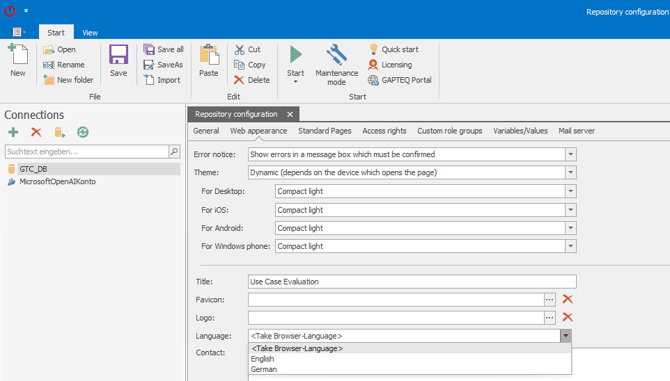
In the Repository Configurations in GAPTEQ-Designer, the following options are available under the “Web appearance” and “Language” tabs:
-
-
DE
-
EN
-
Use browser settings (standard behavior)
-
Tip! If a fixed language (DE or EN) is selected, this setting overrides the language of the web browser.
3. Advantages of centralised language settings
-
Uniform language for all users of an application
-
Better control for internationally used projects
-
Consistent presentation of texts and data formats
-
Reduction of misunderstandings due to inconsistent localization