![GAPTEQ Logo links weiss.png]](https://knowledgebase.gapteq.com/hs-fs/hubfs/GAPTEQ%20Logo%20links%20weiss.png?width=223&height=54&name=GAPTEQ%20Logo%20links%20weiss.png)
Main functions of the SQL console
Using the SQL console - How it works
Important security information (best practices)
1. Main functions of the SQL console
-
Create new tables using SQL statements
-
Ad hoc queries: SELECT statements for data control
-
Data manipulation: quick corrections via UPDATE or DELETE (use with caution!)
-
Schema check: check table structures
-
Add new fields via SQL
-
...
2. Using the Table Builder - How it works
-
Under the “Connections” tab in GAPTEQ-Designer, right-click on the desired data source to open the “SQL console” option
-
In the free area, you can now execute any SQL statements using the “Execute!” button in the main menu
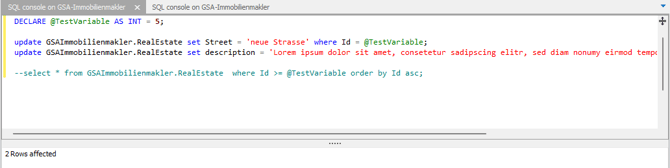
-
The result of the statement or the result is output accordingly.
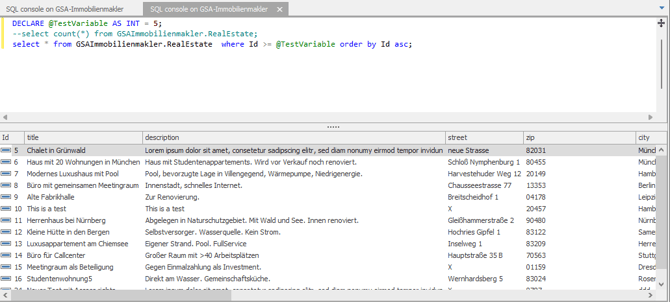
Note! The connection string stored at design time is used for the connection from GAPTEQ Designer to the database.
3. Important security information (best practices)
The SQL console is a powerful tool. Since inputs are sent directly to the SQL server, you should observe the following security rules to avoid data loss or performance bottlenecks.
-
Be careful with destructive commands (UPDATE / DELETE)
Tip: Before performing an UPDATE or DELETE, always execute a SELECT with the same WHERE condition first. This allows you to check exactly which and how many records are affected. -
Use of transactions (safety first)
Use BEGIN TRANSACTION and ROLLBACK/COMMIT to avoid unintended data changes. -
Permissions and context
The SQL console uses the permissions of the database user stored in the data source at “design time.”-
Ensure that only authorized administrators have access to the console feature within GAPTEQ.
-
Changes made via the console may bypass validations that you have defined in the GAPTEQ interface (e.g., via form rules).
-
-
No substitute for complex migrations: SSMS remains the tool of choice for very large scripts or complex DB backups.
-
SQL injection & security
The console is intended for manual administration. Never copy untested SQL scripts from unsecure sources into the console.