![GAPTEQ Logo links weiss.png]](https://knowledgebase.gapteq.com/hs-fs/hubfs/GAPTEQ%20Logo%20links%20weiss.png?width=223&height=54&name=GAPTEQ%20Logo%20links%20weiss.png)
Note! GAPTEQ Assist integrates external AI services directly into the application. The scope and availability of individual functions—such as the processing of certain file formats—depend on the respective AI services.
1. Advantages and typical use cases
Working with files in GAPTEQ Assist offers clear advantages and a wide range of use cases.
-
No more searching / faster work: Relevant information is pulled directly from your documents
-
More context: Answers are based on your specific documents
- Fewer errors: Consistent information from a single source.
This results in numerous typical use cases in everyday project work:
-
Quickly understand technical data sheets
-
Summarize customer documents
-
Filter requirements from specifications
-
Prepare content for quotes, emails, or presentations
2. Uploading files – how it works
-
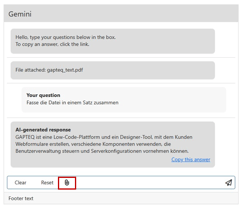
In the “AI chat” component, the corresponding file can be uploaded using the bracket icon
-
Questions about the document can then be asked.
Note! The uploaded files are only available until the web page is reloaded. The uploaded files serve exclusively as a working basis in the current chat – this keeps your project context clear and focused.